Postiz is an open-source social media scheduling and management platform that has quickly positioned itself as a serious contender in the crowded social media tool space. It solves a problem nearly every modern business faces: the chaos of juggling multiple social accounts across different networks, each with its own login, posting quirks, and analytics dashboard. Instead of hopping between Instagram, X, LinkedIn, TikTok, and YouTube, Postiz gives users a single command center where they can plan, generate, schedule, and publish content across 30+ networks.
The platform targets a surprisingly wide audience. Solo creators who want to maintain a consistent posting schedule without spending hours each day will find the AI tools genuinely useful. Marketing teams at agencies managing multiple client accounts will appreciate the customer group feature that keeps everything organized. Developers and automation enthusiasts get something most competitors don't offer: a public API, CLI, and MCP server that lets external AI agents like Claude or ChatGPT draft and schedule posts programmatically. Even privacy-conscious businesses can self-host the entire platform on their own infrastructure.
The competitive landscape includes established players like Buffer, Hootsuite, and Later, all of which offer solid scheduling and analytics. But Postiz differentiates itself through its dual focus on agentic AI and developer tools. While Buffer and Hootsuite have added AI features, they haven't embraced the idea of letting external AI agents drive the platform through a CLI. Postiz also stands out for its open-source nature, which gives users transparency and flexibility that proprietary tools simply can't match. The pricing is aggressive too, starting at $29 per month, which undercuts most competitors at similar feature levels.
This review will examine Postiz's key features, walk through the user experience, explore concrete use cases, and assess whether the platform delivers on its promises. The thesis here is straightforward: Postiz is a genuinely versatile tool that offers exceptional value for its price, but its breadth of features means some areas are more polished than others.
Key Features
AI-Powered Content Generation: Postiz includes a built-in AI agent that can draft posts, generate images, and even create short videos. Users interact with the AI through a chat window, typing prompts like "write a LinkedIn post about our new product launch" and receiving a ready-to-edit draft. The AI can also generate matching images and schedule the post for a specific time, all from a single conversation. This feature is included on all paid plans, with AI image and video allowances varying by tier. For solo creators and small teams, this dramatically reduces the time spent on content creation and helps maintain a consistent posting cadence.
How It Works
Getting started with Postiz is straightforward. Users can sign up for a free trial on the website, which requires no credit card. After creating an account, the first step is to connect social media channels. The platform supports a wide range of networks, and each connection is straightforward, requiring authorization through the respective platform's OAuth flow. Users can connect multiple accounts for each network, with each account counting as one channel toward the plan's limit.
Once channels are connected, users can start creating posts. The content creation interface allows users to write text, upload media, and use the AI assistant to generate content. The AI can be accessed via a chat window, where users can type prompts like "write a tweet about our new product" and receive a draft that can be edited before scheduling. For those using agentic AI, the CLI and MCP server allow external agents to interact with Postiz programmatically, enabling fully automated workflows.
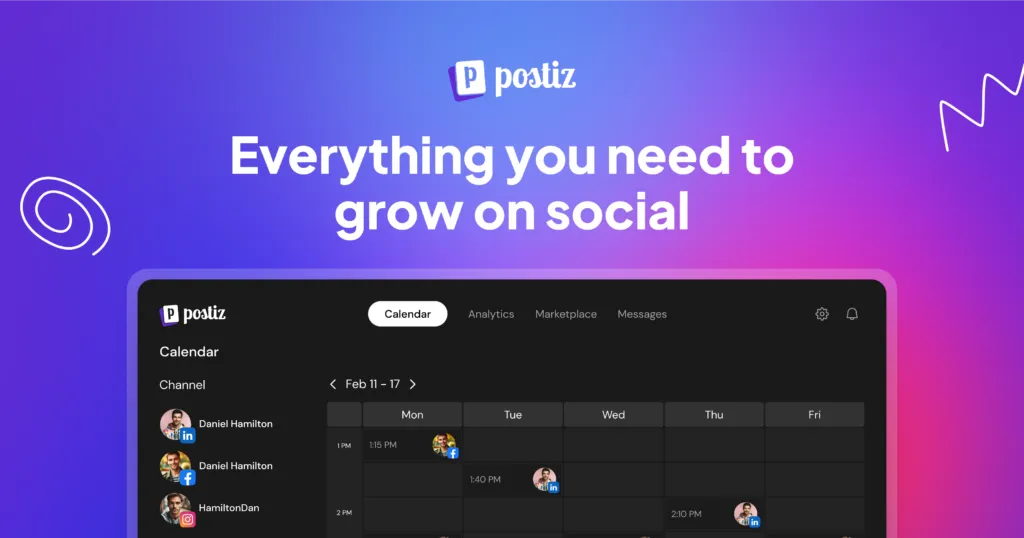
Scheduling is done through the visual calendar. Users can choose a specific date and time for each post, or use the queue feature to let Postiz determine the best times based on past performance. The calendar provides a clear overview of all scheduled content, and users can easily reschedule or edit posts by dragging them. For cross-posting, users select multiple channels for a single post, and each channel gets a preview where they can adjust the content to fit the platform's norms.
After publishing, analytics are automatically collected and displayed in the dashboard. Users can view performance metrics for individual posts or compare across channels. The platform also offers automation features, such as auto-posting from RSS feeds and webhooks, which can be configured in the settings. Overall, the user journey is intuitive, with a gentle learning curve, especially for those familiar with social media schedulers. The AI features add a layer of convenience, but they are optional, so users can stick to manual scheduling if they prefer.
Use Cases
A solo creator managing a YouTube channel, Instagram, and X account: This user can use Postiz to plan a week's worth of content in one sitting. They can use the AI to generate captions and hashtags, schedule posts for optimal times, and then review analytics to see which content performs best. The free trial and affordable Standard plan make it accessible for individual creators who want to grow their audience without hiring a social media manager.
Pros
Supports scheduling across 30+ social networks including niche platforms like Mastodon and Threads, which most competitors omit.
Includes built-in AI agents that can auto-generate post variations and reply suggestions directly within the composer workflow.
Offers a unified analytics dashboard that aggregates engagement metrics from all connected networks into a single comparative view.
Provides role-based team collaboration with granular permissions, allowing separate content editors and approvers without sharing login credentials.
Features a browser extension for quick content clipping and scheduling from any webpage, bypassing the need to open the main dashboard.
Cons
The free plan is limited to only 3 connected social accounts, which is restrictive for users managing multiple brands.
No native mobile app exists, so all scheduling and editing must be done through the responsive web interface, which lacks offline capability.
AI agent features require a paid subscription tier, and the AI-generated content cannot be fully customized for brand-specific tone without manual editing.
Alternative.tools
Alternative.tools review team
We are the editorial team behind Alternative.tools, an independent platform for unbiased reviews of newly launched websites, tools, and products. We test tools hands-on, track pricing and features as they change, and publish practical comparisons and how-to playbooks so you can choose the right tool faster, without the marketing spin.
Agentic Scheduling via CLI and MCP: This is Postiz's most distinctive feature. Through a CLI and MCP server, users can connect external AI agents like Claude, ChatGPT, Codex, or OpenClaw directly to their Postiz account. These agents can draft posts, schedule them, and manage an entire social media calendar without human intervention. For example, a user could prompt Claude to "schedule three tweets about our blog post this week" and the agent would handle it end to end. This positions Postiz as a forward-thinking tool that embraces the growing trend of AI agents in workflow automation, making it ideal for power users and developers who want to integrate AI into their processes.
Multi-Platform Scheduling and Cross-Posting: Postiz supports over 30 social media networks, including major platforms like Facebook, Instagram, X, LinkedIn, TikTok, and YouTube, plus niche networks like Mastodon, Lemmy, and Nostr. Users can write a post once and schedule it to multiple channels simultaneously. Each channel gets its own preview where users can customize the copy, media, or hashtags to fit that platform's norms. This cross-posting capability is a core feature that saves significant time and ensures consistent messaging across platforms. The per-channel previews are particularly useful because what works on LinkedIn often needs tweaking for TikTok.
Visual Content Calendar: The platform provides a visual calendar that serves as the central hub for planning and reviewing posts. Users can see all scheduled posts, drafts, and published content in a single view. The calendar supports drag-and-drop rescheduling, inline editing, and the ability to pause upcoming posts. For teams, this calendar view is invaluable for coordinating content and avoiding duplicate posts. For individuals, it provides a bird's-eye view of their posting schedule, making it easy to spot gaps or over-posting. The calendar is clean and responsive, and it handles the complexity of multiple channels without feeling cluttered.
Comprehensive Analytics: Postiz pulls analytics from each network's official insights API, displaying per-channel and per-post metrics such as impressions, likes, comments, shares, reach, and engagement rate. All data is aggregated into a single dashboard, enabling users to compare performance across platforms without switching between apps. This feature helps users understand what content resonates with their audience and refine their strategy accordingly. The analytics are presented in clear, digestible charts, and users can filter by date range, channel, or post type. While it doesn't offer the deep-dive capabilities of dedicated analytics tools, it provides more than enough for most social media managers.
Team Collaboration and Customer Groups: On Team, Pro, and Ultimate plans, users can invite unlimited team members and assign roles as Admin or Member. The platform also supports organizing connected accounts into customer groups, which is ideal for agencies managing multiple brands or clients. Each group has its own channels, calendar, and analytics, providing a clean workspace for each client within a single Postiz account. This feature eliminates the need to maintain separate accounts for different clients, which is a significant time-saver for agencies. The role-based permissions ensure that team members only see what they need to see.
Automation and Integrations: Postiz offers a public REST API, webhooks, and native integrations with n8n, Make.com, and Zapier. Users can automate posting, pull data, and trigger actions based on events. The platform also supports auto-posting from RSS feeds on higher-tier plans, turning blogs or newsletters into a steady social media cadence. These automation capabilities make Postiz a powerful tool for developers and marketing teams looking to streamline their workflows. The n8n integration is particularly noteworthy, as it allows users to build complex workflows that trigger posts based on events like new blog posts or form submissions.
A 10-person marketing agency managing social media for 15+ clients: The agency can leverage Postiz's customer groups to keep each client's channels, calendar, and analytics separate. Team members can collaborate on content, with admins overseeing approvals. The automation features, such as RSS auto-posting and webhooks, help streamline repetitive tasks, allowing the team to focus on strategy and creative work. The Pro plan's 30-channel limit is sufficient for most agencies, and the ability to assign roles ensures accountability.
A developer building a custom posting app for their own users: A developer can use Postiz's public API and OAuth2 to build a white-label social media scheduling tool. They can integrate Postiz into their existing platform, allowing users to connect their social accounts and schedule posts without leaving the app. The open-source nature of Postiz also allows for customization and self-hosting, giving developers full control over the infrastructure.
An automation enthusiast using n8n for workflow automation: This user can use the Postiz node in n8n to trigger posts based on events, such as new blog posts or form submissions. They can set up a workflow that automatically generates a social media post from an RSS feed and schedules it across multiple channels, saving hours of manual work each week. The integration is seamless, and the webhook support adds another layer of flexibility.
A privacy-conscious business that wants to self-host: A company that values data privacy can self-host Postiz on their own servers, ensuring that their social media data and content remain within their infrastructure. This is particularly appealing for businesses in regulated industries or those with strict data governance policies. Self-hosting also eliminates monthly subscription fees, making it a cost-effective long-term solution.
Design & User Experience
Postiz presents a modern, clean interface that feels professional without being sterile. The dashboard uses a light theme with subtle accents, and the layout is well-organized, with clear navigation between the calendar, analytics, and settings. The visual calendar is the standout element, offering a comprehensive view of scheduled content that is both functional and aesthetically pleasing. The drag-and-drop functionality works smoothly, and the ability to edit posts inline without navigating away from the calendar is a thoughtful touch.
The onboarding process is guided and intuitive. New users are walked through connecting their first channels, and the interface provides helpful tooltips and contextual hints. The learning curve is gentle, especially for users familiar with other social media schedulers. The AI chat interface is accessible from the post creation screen, making it easy to generate content without switching contexts.
One area that could be improved is the mobile experience. While the platform is responsive, the desktop version is clearly the primary focus. On smaller screens, the calendar view can feel cramped, and some features require more taps to access. That said, the core scheduling and publishing functions work fine on mobile, which is sufficient for most users who do their heavy lifting on desktop.
The design decisions reflect a focus on functionality over flash. There are no unnecessary animations or decorative elements that slow things down. The analytics dashboard presents data in clear, readable charts, and the ability to compare performance across channels is genuinely useful. Overall, the user experience is solid, with minor rough edges that don't detract significantly from the platform's utility.
Pricing & Value
Postiz offers four paid plans, all billed monthly, with annual billing saving about 20%. The Standard plan costs $29 per month and includes 5 channels, 400 posts per month, AI text, 20 AI images, 3 AI videos, public API access, and 2 webhooks. This plan is best suited for solo creators and small businesses just getting started with social media scheduling.
The Team plan at $39 per month increases to 10 channels, unlimited posts, team members, 100 AI images, 10 AI videos, RSS auto-posting, and 10 webhooks. This is the sweet spot for most small teams and growing businesses that need collaboration features and more AI allowances.
The Pro plan at $49 per month offers 30 channels, unlimited posts, 300 AI images, 30 AI videos, and 30 webhooks. This plan is designed for agencies and larger teams managing multiple clients. The Ultimate plan at $99 per month provides 100 channels, unlimited posts, 500 AI images, 60 AI videos, and unlimited webhooks, making it suitable for enterprises and high-volume users.
There is no permanent free plan, but a free trial is available. This is a notable difference from competitors like Buffer, which offers a limited free tier. However, the paid pricing is competitive, and the feature set at each tier is generous compared to alternatives. The clear upgrade path from Standard to Ultimate ensures that users can scale without switching platforms.
Who Is Postiz Best For?
Postiz is best for three specific user segments. First, solo creators and small business owners who want to maintain a consistent social media presence without spending hours each day. The AI content generation and scheduling features are genuinely time-saving, and the Standard plan is affordable. Second, marketing agencies managing multiple client accounts. The customer groups feature is a game-changer, allowing agencies to keep each client's channels, calendar, and analytics separate within a single account. Third, developers and automation enthusiasts who want to integrate AI agents or build custom workflows. The CLI, MCP server, and public API are unique offerings that set Postiz apart from competitors.
Users who might want to look elsewhere include those who need a permanent free plan. Postiz's trial is limited, and the lack of a free tier could be a barrier for hobbyists or very small businesses with tight budgets. Additionally, users who need deep, enterprise-grade analytics might find Postiz's reporting capabilities somewhat basic compared to dedicated tools like Sprout Social or Brandwatch. For those users, a more specialized analytics platform might be a better fit.
Final Thoughts
Postiz is a genuinely impressive social media management tool that delivers on its promise of being an all-in-one solution. Its biggest strengths are the AI-powered content generation, the agentic scheduling via CLI and MCP, and the comprehensive multi-platform support. The pricing is competitive, and the open-source nature adds a layer of transparency and flexibility that proprietary tools can't match.
The most notable limitations are the lack of a permanent free plan and the somewhat basic analytics compared to dedicated reporting tools. The mobile experience could also be more polished. However, these are minor issues in the context of the platform's overall value.
Postiz is worth trying if you're a solo creator, a growing team, or an agency looking for a cost-effective way to manage social media across multiple platforms. The free trial lets you explore the features without commitment, and the clear upgrade path means you can start small and scale as your needs grow. Consider Postiz when you need a tool that combines scheduling, AI content creation, and developer-friendly integrations in one place. It's a strong contender in the social media management space, and its forward-thinking approach to AI agents makes it a platform worth watching.